TROUBLESHOOTING NOTE
DMARC policy is none: what it means and when to tighten
Updated
Your report says the DMARC policy is none. That is a normal place to start while you work out which services send mail for you. It means you haven't asked mail providers to block messages that fail DMARC yet. Here's what to check before you tighten the policy, so your own invoices and newsletters don't get caught in the change.
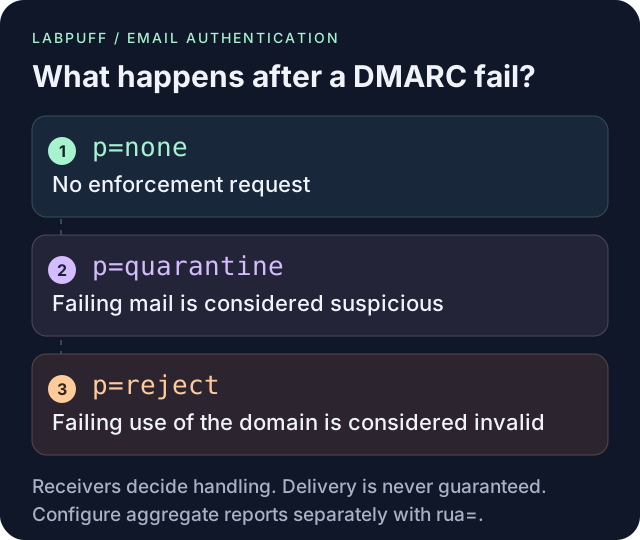
DMARC policy is none: what it means in plain English
Think of p=none as a camera, not a lock. With reporting set up, it helps you see who's using your domain to send mail. It doesn't ask anyone to block a message. Mail providers still run their own spam checks, so this isn't a promise that everything gets delivered.
DMARC is a note you publish in your domain's DNS, the public directory of settings for your domain. The note asks providers like Gmail and Outlook to check whether a message that says it is from you really is. They check with two older tools: SPF, a list of the servers allowed to send for your domain, and DKIM, a digital signature attached to each message. Then your note says what to do with messages that fail.
The p= part is your instruction for mail that fails: none leaves the decision to the receiving provider, quarantine asks it to treat the message as suspicious, and reject asks it to refuse the message. The provider still has the final say.
The camera comparison has one catch: you need somewhere for the reports to go. Add an address with rua= and check what arrives. Without it, publishing p=none doesn't request aggregate reports. Even with it, not every provider sends them.
How to check your DMARC policy with the LabPuff DMARC Checker
Step 1: Open the DMARC Checker, type your domain into the box labeled Domain or website URL, and press Run check. Use the part of your email address after the @, such as example.com. The checker looks for the record at exactly the name you type, so entering www.example.com checks a different place and may report Not found even though your real domain has a record.
Step 2: Read the Policy row. It shows your whole record, for example v=DMARC1; p=none; rua=mailto:reports@example.com. Then read Basic syntax. Pass means LabPuff recognized the version and the policy value.
Step 3: Find the Enforcement row. With p=none it shows none and the status Information, which is not a failure. LabPuff's note says monitoring only is a normal first step and to review reports before increasing enforcement. If you see quarantine or reject here, the status is Pass.
Step 4: Find the Aggregate reporting row. It says Configured when your record contains an rua= address, and Not configured with a warning when it does not. This is the row that matters most when your policy is none. Without rua=, this record requests no aggregate reports. LabPuff only checks that an address is listed. It does not check that the mailbox works or that anyone reads what arrives.
You will also see rows for DKIM alignment setting and SPF alignment setting. They show Relaxed (default) unless your record says otherwise, and Relaxed is a sensible choice for most small senders. These rows describe your settings, not whether your real messages pass. Only the headers of a real message show that, and the last section below explains how to read them.
Before you tighten anything, ask who else sends email for the business. Someone may have set up a newsletter tool, CRM or help desk without touching your main mailbox. Keep that list beside your reports. The reports can help you spot a service you missed, but they only cover mail seen by providers that send reports.
Is p=none a problem, and when should I move to quarantine or reject?
We wouldn't rush to change p=none just to get a green result in a checker. We'd start by reading the reports and fixing the real mail that fails. If nobody is doing that, the setting can sit there for years without getting you any closer to blocking spoofed mail.
Consider quarantine once you've checked every legitimate sending service and worked through failures you can't explain. You may still see spoofed mail in the reports; you aren't trying to make that pass. For your own mail, either SPF or DKIM needs to pass using a domain that matches your From address under DMARC's alignment rules. A newsletter tool can pass DKIM using its own domain and still fail DMARC for yours.
Wait long enough to catch the slow senders. An invoicing, payroll or booking system that emails once a month will not show up in a week of reports. No official minimum wait exists. A full month of reports is the least that covers monthly senders, and for anything quarterly it is worth asking whoever runs that system directly.
For a domain that never sends email, p=reject can be appropriate without a sending trial. Check subdomains and third-party services first: a root-domain policy can affect subdomain mail too. A website redirect does not prove the domain is unused for email.
You are also not required to tighten today. Google's sender rules ask for a DMARC record from anyone who sends more than 5,000 messages a day to personal Gmail accounts, and Google says the policy for that requirement can be none. Smaller senders need SPF or DKIM under those rules. Tightening is about protecting your name from fakes, and it is your call when.
How to change DMARC from none to quarantine without blocking your own mail
Before you change anything, copy your current DMARC record into a note. That copy is your undo. Also write down where you edit DNS, which is usually your domain registrar or whoever hosts your DNS.
Step 1: Make sure reports are arriving. Create a mailbox for them, for example dmarc-reports at your own domain, and put rua=mailto:dmarc-reports@yourdomain.com in the record, with a semicolon between each part. Use an address on the same domain. Reports sent to a different domain need that domain's permission, and LabPuff does not check it. Each provider chooses its own schedule, and the standard describes daily or more frequent reports. They arrive as compressed XML attachments. The first ones are hard to read, which is normal. Each one lists the servers that sent mail as you and whether those servers passed.
Step 2: List every service that sends email as your domain. Common ones are your main mailbox provider, your website's contact form, a newsletter tool, invoicing or booking software, and a help desk. Match each one against your reports. For each service, look in its help pages for domain authentication or custom domain setup. That page gives you the SPF and DKIM records it needs.
Step 3: Work through the services you recognize that are failing. Open each one's custom-domain authentication instructions and compare them with your DNS records. Check whether its DKIM signing domain or SPF envelope domain lines up with your From address. Keep one SPF record at each DNS name where you use SPF, and don't remove an active sender just to make the record shorter.
Step 4: Change p=none to p=quarantine and touch nothing else in the record. Warning: from this point, mail that fails may go to spam at providers that honor your request. Undo: change it back to p=none. DNS caching means the undo is not instant, so make the change early in a work week, not on a Friday evening, and send a test from every service right afterward.
Step 5: Watch your reports and your inbox for a few weeks. Listen for complaints such as an invoice that never arrived. If nothing legitimate fails, p=reject is the next level. Mailing lists and forwarding can break DMARC even when your setup is right, because the message changes on the way, and the standard flags this as a compatibility concern for rejection. Quarantine is a legitimate place to stop.
You may come across older advice to roll out DMARC with pct=25. The 2026 standard, RFC 9989, removes pct and adds a t=y test mode. Mail providers won't necessarily adopt that change at the same time. Keep testing your real mail rather than relying on either setting to catch mistakes. LabPuff still shows pct when it's present; that doesn't tell you whether a provider uses it.
How to confirm the DMARC change worked
Step 1: Wait for DNS to refresh. The delay depends on the record's TTL, short for time to live, which is how long other servers may keep the old answer. Many DNS hosts show it next to the record. Then run the LabPuff DMARC Checker again. Enforcement should now read quarantine with the status Pass.
Step 2: If the checker still shows none, you may have edited the wrong DNS host. Run the DNS Lookup on your domain and look at the NS records, which name the servers that actually answer for your domain. Edit the record there.
Step 3: Send a test message from each service to a Gmail address. Open it, choose Show original from the three-dot menu, and look for DMARC: PASS near the top. A service that shows FAIL needs its DKIM or SPF fixed before you go any further.
LabPuff reads the record you published. It cannot tell you what each mail provider does with your messages, so keep reading your reports for a few weeks after any change.
When paying for DMARC monitoring makes sense
Start with your provider’s documentation. With one or two sending services, you can open a few report files yourself, or follow your email provider's own DMARC instructions. That is enough for a small setup.
Report volume is the main reason to consider a paid service. Reports are compressed XML files that arrive from many providers, and a busy domain collects a lot of them. A DMARC monitoring service typically gives you an address to put in rua=, reads those files for you, and shows a plain list of who sent mail as your domain and whether each sender passed.
It is worth considering if you use many sending services, if reports show senders you cannot identify, or if you want to reach reject with less guesswork. If you run one mailbox provider and one contact form, you can probably skip it.
Common questions about DMARC p=none
Does p=none guarantee delivery? No. It makes no DMARC enforcement request, but receivers can still reject or filter mail under their own rules.
Can someone still fake my email with p=none? Yes. Your policy asks receivers to do nothing about failing messages, so fakes are not blocked by DMARC. Some receivers may still filter them for other reasons.
Where do DMARC reports go? To the address in the rua= part of your record. If your record has no rua=, no reports are requested.
Do I need DMARC if I send only a few emails? Gmail’s published rules require DMARC for bulk senders to personal Gmail accounts. Other providers or business policies may have different requirements. Smaller senders can still use reports to investigate domain use.
I changed the record, so why does the checker still say none? Usually DNS caching, or you edited a DNS host that does not answer for your domain. Wait for the TTL to pass, then check the NS records as described above.
Reference and scope
IETF RFC 9989: DMARC (replaces RFC 7489)
- RFC 9990: aggregate reporting and external report destinations
- Google: requirements for senders to personal Gmail accounts
- Google: open a message’s full headers
This guide explains a diagnostic workflow. Provider-specific configuration and actual messages or browser behavior require separate verification. The linked tools report bounded observations, not a complete audit.